This document explains how to configure the camera OV5640 on STM32H747 using DCMI and JPEG.
- OV5640 Datasheet
- STM32 Driver for OV5640
- STM32 DCMI manual for cameras
- STM32 B-CAMS-OMV Board documentation
- Guide to improve the fps
CubeMX configuration
For interfacing the camera is necessary to configure:
- DCMI
- SDRAM, that is configure using BSP and not with CubeMX
- I2C
- DMA
- GPIO configuration
- MPU Configuration
- (Optional) USART 1
- (Optional) SDMMC
- (Optional) LittleFS
System architecture
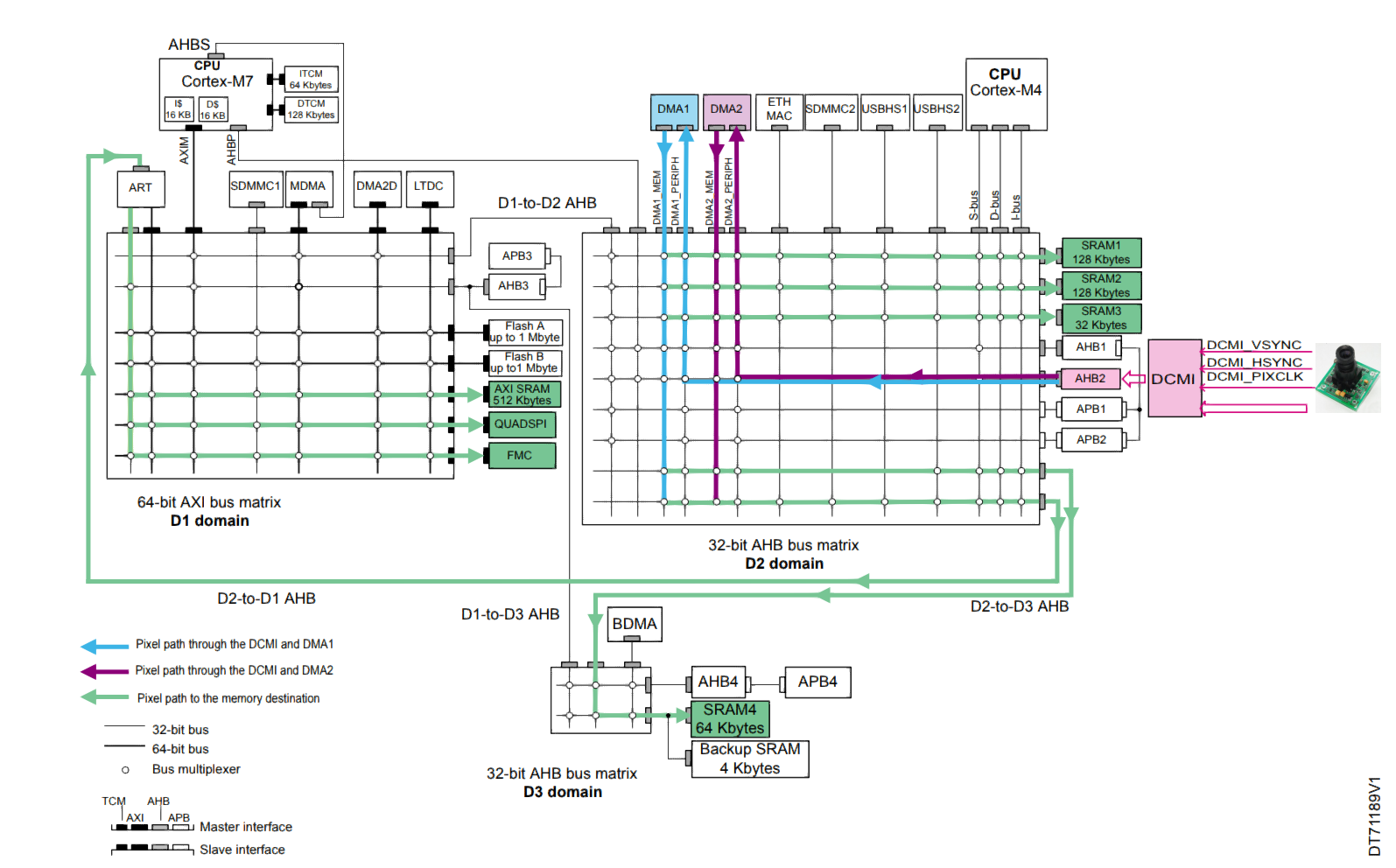
DCMI Configuration
Enable DCMI on Cortex-M7 Domain.
On parameter settings:
- Pixel clock polarity: OV5640_POLARITY_PCLK_HIGH Configured by the library in stm32-ov5640/ov5640.c:458
- Vertical synchronization polarity: OV5640_POLARITY_VSYNC_HIGH. Configured by the library stm32-ov5640/ov5640.c:458
- Horizontal synchronization polarity: OV5640_POLARITY_HREF_HIGH Configured by the library stm32-ov5640/ov5640.c:458
- Frequency of frame capture: All frames are captured
- Jpeg mode: Enabled
Nvic settings:
- DMA2 stream 7 global interrupt: Enabled
- DCMI global interrupt: Enabled
Gpio settings are automatically configured.
DMA
Configuration:
- DMA request: DCMI
- Stream: DMA2 Stream 7
- Direction: Peripheral To Memory
- Priority: High
- Mode: Circular. But depends on the resolution
- Increment address: Peripheral disabled, Memory enabled
- Use FIFO: Enabled
- Threshold: Full
- Data width: Peripheral word, Memory word
- Burst size: Peripheral single, Memory 4 increment. Better performance as described in 6.4.5 in STM32 DCMI manual for cameras
I2C Configuration
Enable I2C4 on Cortex-M7 Domain.
Its configured by default.
Paremeter settings:
- Custom timing: Disabled
- I2C Speed Mode: Standard Mode
- I2C Speed Freq (KHz): 100
- Analog filter: Enabled
GPIO settings:
- PD12: I2C4_SCL
- PD13: I2C4_SDA
GPIO Configuration
This is specific for each board. The DCMI module will configure all the gpios, except the DCMI_PWR_EN, that is necessary to configure by hand. In my STM32H757i-Disco the DCMI_PWR_EN is set in the PJ14.
To configure go to GPIO > GPIO > PJ14:
- Pin context: M7
- GPIO Output Level: Low
- GPIO Mode: Output Push Pull
- GPIO Pull-up/Pull-down: No pull-up and no pull down
- Maximum output speed: Low
- User Label: DCMI_PWR_EN
MPU Configuration
We need to add the sdram configuration on the MPU. For this go to Cortex_M7 > Parameter settings > Unit region 1:
- MPU Region: Enabled
- MPU Region base address: 0xD0200000
- MPU Region Size: 32 MB
- MPU SubRegion Disable: 0x0
- MPU TEX field level: level 0
- MPU Access Permission: All access permitted
- MPU Instruction Access: Enable
- MPU Shareable permission: Disable
- MPU Cacheable Permission: Disable
- MPU Bufferable Permission: Disable
(Optional) USART 1
Enable USART 1 on M7 with the next configurations:
- Mode: Asynchronous
(Optional) SDMMC
Enable SDMMC for M7 with Mode SD 1 Bit.
(Optional) LittleFS
Enable the FS for accessing the SD card as a fat. Middleware and software packs > FATFS_M7 > Enable for M7 > SD Card
CubeIDE configuration
In the CubeIDE is necessary to import the camera drivers, and the files necessary to enable the SDRAM using the BSP.
Copy your BSP folder from your CubeMX to your CubeIDE. In my linux machines is in ~/STM32Cube/Repository/STM32Cube_FW_H7_V1.13.0/Drivers/BSP/. Copy that folder into your PROJECT_PATH/Drivers/
Open your project on STM32CubeIDE, and configure the next on your CM7 Project:
- Create a (Logic) Folder in Drivers > BSP > Components. Its necessary to import the source files of the drivers, on that folder you go to Create new file, advanced, Link to file in the file system. And link the next files:
PROJECT_PATH/Drivers/BSP/Components/is42s32800j/is42s32800j.c: The SDRAM driverPROJECT_PATH/Drivers/BSP/Components/ov5640/ov5640_reg.c: Part of the camera driverPROJECT_PATH/Drivers/BSP/Components/ov5640/ov5640.c: Part of the camera driver
- Create a (Logic) Folder in Drivers > BSP > STM32H747I_DISCO. Its necessary to import the source files of the BSP, on that folder you go to Create new file, advanced, Link to file in the file system. And link the next files:
PROJECT_PATH/Drivers/BSP/STM32H747I-DISCO/stm32h747i_discovery_sdram.c: The BSP for the sdramPROJECT_PATH/Drivers/BSP/STM32H747I-DISCO/stm32h747i_discovery.c: The BSP source
- Add the new include paths to your CM7 project:
- Go to CM7 Project > Properties > C/C++ Build > Settings > MCU/MPU GCC Compiler > Include paths. And add:
../../Drivers/BSP/Components/is42s32800j../../Drivers/BSP/STM32H747I-DISCO../../Drivers/BSP/Components/ov5640
- Go to CM7 Project > Properties > C/C++ Build > Settings > MCU/MPU GCC Compiler > Include paths. And add:
- Copy the file
PROJECT_PATH/Drivers/BSP/STM32H747I-DISCO/stm32h747i_eval_conf_template.hinto your project inCM7/Core/Inc/stm32h747i_eval_conf.h - Copy the file
PROJECT_PATH/Drivers/BSP/Components/is42s32800j/is42s32800j_conf_template.hinto your project inCM7/Core/Inc/is42s32800j_conf.h - Modify your
stm32h7xx_hal_conf.hin order to enable SDRAM, by uncommenting#define HAL_SDRAM_MODULE_ENABLED
From main.c:
//#define DUAL_CORE_BOOT_SYNC_SEQUENCE

/* USER CODE BEGIN Private defines */
#define CAMERA_FRAME_BUFFER               0xD0200000
#define QVGA_RES_X      320
#define QVGA_RES_Y      240
/* USER CODE END Private defines */

/* USER CODE START PV */
static volatile uint8_t frame_captured = 0;
static OV5640_Object_t CameraObj;
/* USER CODE END PV */

/* USER CODE BEGIN 0 */
static void UART_Print(const char *str)
{
  HAL_UART_Transmit(&huart1, (uint8_t *)str, (uint16_t)strlen(str), HAL_MAX_DELAY);
}

static int32_t OV5640_IO_Init(void)      { return OV5640_OK; }
static int32_t OV5640_IO_DeInit(void)    { return OV5640_OK; }
static int32_t OV5640_IO_GetTick(void)   { return (int32_t)HAL_GetTick(); }

static int32_t OV5640_IO_WriteReg(uint16_t addr, uint16_t reg,
                                   uint8_t *pData, uint16_t len)
{
  if (HAL_I2C_Mem_Write(&hi2c4, addr, reg, I2C_MEMADD_SIZE_16BIT,
                         pData, len, 1000) != HAL_OK)
    return OV5640_ERROR;
  return OV5640_OK;
}

static int32_t OV5640_IO_ReadReg(uint16_t addr, uint16_t reg,
                                  uint8_t *pData, uint16_t len)
{
  if (HAL_I2C_Mem_Read(&hi2c4, addr, reg, I2C_MEMADD_SIZE_16BIT,
                        pData, len, 1000) != HAL_OK)
    return OV5640_ERROR;
  return OV5640_OK;
}

void HAL_DCMI_FrameEventCallback(DCMI_HandleTypeDef *hdcmi_cb)
{
  (void)hdcmi_cb;
  frame_captured = 1;
}

static int32_t Camera_Init(void)
{
  OV5640_IO_t  CameraIO;
  uint32_t     camera_id = 0;
  char         buf[256];

  CameraIO.Init      = OV5640_IO_Init;
  CameraIO.DeInit    = OV5640_IO_DeInit;
  CameraIO.Address   = 0x78U;   /* 7-bit 0x3C shifted left */
  CameraIO.WriteReg  = OV5640_IO_WriteReg;
  CameraIO.ReadReg   = OV5640_IO_ReadReg;
  CameraIO.ModifyReg = NULL;
  CameraIO.GetTick   = OV5640_IO_GetTick;

  if (OV5640_RegisterBusIO(&CameraObj, &CameraIO) != OV5640_OK)
    return -1;

  if (OV5640_ReadID(&CameraObj, &camera_id) != OV5640_OK)
    return -1;

  if (camera_id != 0x5640)
    return -1;

  if (OV5640_Init(&CameraObj, OV5640_R320x240, OV5640_JPEG) != OV5640_OK)
    return -1;

  if (OV5640_Start(&CameraObj) != OV5640_OK)
    return -1;

  return 0;
}

static int32_t Camera_CaptureSnapshot(uint32_t *out_jpeg_offset,
                                       uint32_t *out_jpeg_size)
{
  const uint32_t CAPTURE_TIMEOUT_MS = 3000U;

  *out_jpeg_offset = 0;
  *out_jpeg_size   = 0;
  frame_captured   = 0;

  __HAL_DCMI_ENABLE_IT(&hdcmi, DCMI_IT_FRAME);

  /* Allocate the full DMA budget upfront – the actual JPEG size is unknown
   * before compression, so we hand the DMA the worst-case word count for a
   * YUV422 frame at the configured resolution.                              */
  uint32_t dma_size_words = (QVGA_RES_X * QVGA_RES_Y * 2U) / 4U;

  /* Start DCMI in snapshot mode – one frame then stop automatically */
  if (HAL_DCMI_Start_DMA(&hdcmi, DCMI_MODE_SNAPSHOT,
                          (uint32_t)CAMERA_FRAME_BUFFER,
                          dma_size_words) != HAL_OK)
  {
    UART_Print("[CAM] HAL_DCMI_Start_DMA failed\r\n");
    return -1;
  }

  uint32_t t_start = HAL_GetTick();

  /* Spin until the DCMI frame-complete ISR sets the flag or we time out */
  while (frame_captured == 0)
  {
    if ((HAL_GetTick() - t_start) >= CAPTURE_TIMEOUT_MS)
    {
      HAL_DCMI_Stop(&hdcmi);
      UART_Print("[CAM] Capture timeout\r\n");
      frame_captured = 0;
      return -1;
    }
  }

  uint32_t remaining_words = __HAL_DMA_GET_COUNTER(hdcmi.DMA_Handle);
  HAL_DCMI_Stop(&hdcmi);
  frame_captured = 0;

  /* Total bytes written by DMA into the frame buffer */
  uint32_t dma_bytes = (dma_size_words - remaining_words) * 4U;

  /* --------------------------------------------------------------------- *
   * Locate JPEG SOI marker (0xFF 0xD8) and EOI marker (0xFF 0xD9)         *
   * The OV5640 may prepend padding bytes before the actual JPEG stream.   *
   * --------------------------------------------------------------------- */
  uint8_t *buf_ptr = (uint8_t *)CAMERA_FRAME_BUFFER;
  uint32_t soi_offset = 0;
  uint8_t  soi_found  = 0;

  for (uint32_t i = 0; i + 1U < dma_bytes; i++)
  {
    if (buf_ptr[i] == 0xFFU && buf_ptr[i + 1U] == 0xD8U)
    {
      soi_offset = i;
      soi_found  = 1;
      break;
    }
  }

  if (!soi_found)
  {
    UART_Print("[CAM] JPEG SOI marker (0xFFD8) not found\r\n");
    return -1;
  }

  /* Search for EOI marker (0xFF 0xD9) starting just after SOI */
  uint8_t  eoi_found  = 0;
  uint32_t eoi_offset = 0;

  for (uint32_t i = soi_offset + 2U; i + 1U < dma_bytes; i++)
  {
    if (buf_ptr[i] == 0xFFU && buf_ptr[i + 1U] == 0xD9U)
    {
      /* EOI is the two-byte sequence itself; include both bytes */
      eoi_offset = i + 2U;
      eoi_found  = 1;
      break;
    }
  }

  if (!eoi_found)
  {
    UART_Print("[CAM] JPEG EOI marker (0xFFD9) not found\r\n");
    return -1;
  }

  *out_jpeg_offset = soi_offset;
  *out_jpeg_size   = eoi_offset - soi_offset;

  char dbg[80];
  snprintf(dbg, sizeof(dbg),
           "[CAM] JPEG markers found: offset=%lu size=%lu bytes\r\n",
           (unsigned long)soi_offset, (unsigned long)*out_jpeg_size);
  UART_Print(dbg);

  return 0;


}

static int32_t SD_SaveJPEG(uint32_t jpeg_offset, uint32_t jpeg_size)
{
  static uint32_t file_index = 0;
  char     filename[32];
  FRESULT  res;
  FIL      file;
  UINT     bw;
  char     buf[64];

  if (jpeg_size == 0)
  {
    UART_Print("[SD] Zero bytes to write, skipping\r\n");
    return -1;
  }

  res = f_mount(&SDFatFS, (TCHAR const *)SDPath, 1);
  if (res != FR_OK)
  {
    snprintf(buf, sizeof(buf), "[SD] f_mount failed (%d)\r\n", res);
    UART_Print(buf);
    return -1;
  }

  /* Find the next unused filename */
  do
  {
    file_index++;
    if (file_index > 9999U)
    {
      UART_Print("[SD] File index overflow\r\n");
      f_mount(NULL, (TCHAR const *)SDPath, 0);
      return -1;
    }
    snprintf(filename, sizeof(filename), "IMG_%04lu.JPG", (unsigned long)file_index);
  }
  while (f_stat(filename, NULL) == FR_OK);

  res = f_open(&file, filename, FA_CREATE_NEW | FA_WRITE);
  if (res != FR_OK)
  {
    snprintf(buf, sizeof(buf), "[SD] f_open failed (%d)\r\n", res);
    UART_Print(buf);
    f_mount(NULL, (TCHAR const *)SDPath, 0);
    return -1;
  }

  /* Write only the valid JPEG payload: from SOI (0xFFD8) to EOI (0xFFD9)
   * inclusive, skipping any padding bytes the DMA may have prepended.    */
  const uint8_t *jpeg_start = (const uint8_t *)CAMERA_FRAME_BUFFER + jpeg_offset;
  res = f_write(&file, jpeg_start, jpeg_size, &bw);
  f_close(&file);
  f_mount(NULL, (TCHAR const *)SDPath, 0);

  if (res != FR_OK || bw != jpeg_size)
  {
    snprintf(buf, sizeof(buf), "[SD] Write error (%d), wrote %u/%lu bytes\r\n",
             res, (unsigned)bw, (unsigned long)jpeg_size);
    UART_Print(buf);
    return -1;
  }

  snprintf(buf, sizeof(buf), "[SD] Saved %s (%lu bytes)\r\n",
           filename, (unsigned long)jpeg_size);
  UART_Print(buf);
  return 0;
}


/* USER CODE END 0 */

/* USER CODE BEGIN 2 */
if(BSP_SDRAM_Init(0) != BSP_ERROR_NONE){
    while(1){}
}
Camera_Init();
HAL_Delay(1000);
uint32_t jpeg_offset = 0;
uint32_t jpeg_size   = 0;
if (Camera_CaptureSnapshot(&jpeg_offset, &jpeg_size) == 0)
    SD_SaveJPEG(jpeg_offset, jpeg_size);
/* USER CODE END 2 */
Decoding the video
I use the next command to parse the image:
ffmpeg -f mjpeg -framerate 11 -i VID_0030.MJP -c copy output.avi